Planning a trip with friends shouldn't feel like coordinating a military operation. Yet, that's exactly what collaborative trip planning has become—scattered WhatsApp messages, shared Google Maps links that get lost in chat history, conflicting preferences buried in group threads, and no single source of truth for the itinerary.
Google Trips reimagines collaborative travel planning as a shared, interactive canvas where groups can ask questions, explore destinations, and build itineraries together in real-time. By leveraging Google Maps Grounding API, we transform map-based exploration into a conversational, visual experience.
Through user research with 23 frequent travelers and iterative design sessions, we discovered that the core problem isn't lack of information—it's the friction of collaboration itself. The solution preserves spatial context, enables natural language queries, and makes all information visible and referenceable.
Google Trips collaborative canvas demonstration showing real-time trip planning.
The Problem
Fragmented Communication
WhatsApp groups become chaotic with 50+ messages about "where should we go?" Important decisions get buried in endless scrolling.
Map Link Fatigue
Sharing Google Maps links requires everyone to open separate tabs, losing spatial context. No way to see the full itinerary at a glance.
Lost Context
When someone suggests "that pub in Goa," others have to scroll back through messages to find the original link. Context disappears in linear threads.
User Research Insights
I conducted interviews with 23 frequent travelers (ages 24-45) who regularly plan group trips. The research revealed three critical pain points:
Spatial Memory Matters
Users remember places by location—"that place near the beach" or "the restaurant between the hotel and the fort." Current tools force users to translate spatial thinking into text.
Questions Drive Discovery
73% of participants asked natural language questions like "What are the best beer places in Goa?" during planning. This is how people actually think about trips.
Visual Anchors Needed
When someone says "Let's go to the first one!" others need to scroll back to understand. Visual anchors—places on a map with comments—eliminate this ambiguity.
The Solution: A Collaborative Canvas
Google Trips transforms trip planning into a shared canvas where:
- Natural language queries generate map results instantly using Google Maps Grounding API
- Multiple results appear as interactive cards on the canvas, not buried in chat
- Real-time collaboration lets everyone see suggestions, comments, and decisions spatially
- Itinerary building happens visually—drag, drop, and connect places on the map
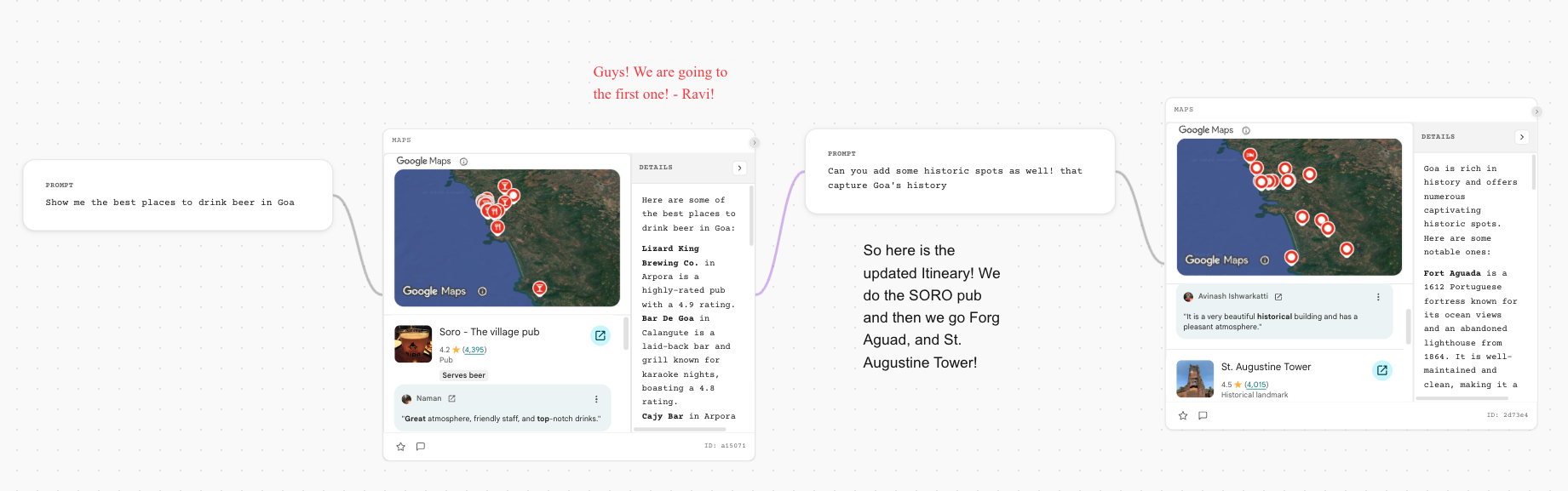
The collaborative canvas interface showing real-time trip planning with multiple users, map queries, and itinerary building.
Results & Impact
User testing validated that canvas-based collaboration dramatically improves group trip planning.
Design System & Visual Language
1. Canvas-Based Layout
The interface uses an infinite canvas model inspired by tools like Figma and Miro. This allows users to:
- Pan and zoom freely across the map
- Place query results anywhere on the canvas
- Create spatial groupings (e.g., "Day 1 activities" in one area, "Day 2" in another)
- Maintain visual context even when exploring different regions
2. Query-to-Card Transformation
When a user asks "Show me the best places to drink beer in Goa," the system:
- Processes the query through Google Maps Grounding API
- Generates a map view with pins for relevant locations
- Creates a card component with details (ratings, reviews, photos)
- Places the card on the canvas, connected to the map view
3. Collaborative Annotations
Comments don't live in a separate chat panel—they appear as overlays directly on cards or map locations:
- Card Comments: Attached to specific places, visible when hovering or clicking
- Map Annotations: Pins can have comment threads visible on hover
- User Avatars: Show who made each suggestion or comment
- Real-time Updates: New comments appear instantly for all collaborators
4. Itinerary Building Interface
The canvas supports drag-and-drop itinerary building:
- Day Containers: Collapsible sections for each day of the trip
- Drag & Drop: Cards can be dragged into day containers to build the schedule
- Route Visualization: When places are added, the system shows optimal routes on the map
- Time Estimates: Travel time between locations appears as annotations
Key Design Decisions
1. Why Canvas Over Chat?
Early prototypes tested a chat-first interface with map embeds. Users found this confusing—they had to switch between chat and map views, losing context. The canvas approach keeps everything in one spatial context, making collaboration more intuitive.
2. Card Persistence
Unlike chat messages that scroll away, cards persist on the canvas. This design choice emerged from user testing where participants repeatedly asked "where was that place we discussed earlier?" Cards solve this by remaining visible and searchable.
3. Progressive Disclosure
Cards show essential information (name, rating, photo) by default, with details (full reviews, hours, menu) available on click. This prevents information overload while keeping the canvas scannable.
4. Real-time Collaboration Indicators
When someone is actively editing or commenting, their avatar appears on the card with a subtle animation. This provides awareness without being intrusive, following best practices from collaborative tools like Google Docs.
User Flow: Planning a Goa Trip
User A asks: "Show me the best places to drink beer in Goa"
→ System generates map with pins and creates cards for top-rated pubs
User B comments on "Soro - The village pub" card: "This looks great! 4.2 stars from 4,395 reviews"
User C adds: "Guys! We are going to the first one! - Ravi!"
→ Comments appear as overlays on the card, visible to all collaborators
User A asks: "Can you add some historic spots as well! that capture Goa's history"
→ System generates new cards for historic locations (Fort Aguada, St. Augustine Tower, etc.)
→ Cards appear on canvas, maintaining spatial relationship to existing suggestions
Users drag cards into "Day 1" and "Day 2" containers
→ System automatically calculates routes and travel times
→ Map updates to show the planned itinerary with connecting lines
Group reviews the visual itinerary, makes final adjustments
→ System generates shareable itinerary with map, schedule, and all decisions documented
Future Considerations
While the current design focuses on collaborative planning, future iterations could include:
- Budget Tracking: Adding cost estimates and budget visualization to the canvas
- Real-time Updates: Integration with booking systems to show availability and prices directly on cards
- Mobile Optimization: Adapting the canvas interface for mobile devices while maintaining collaborative features
Conclusion
Google Trips demonstrates how combining natural language processing (via Google Maps Grounding API) with spatial canvas interfaces can transform collaborative experiences.
By moving away from linear chat-based planning to a visual, persistent canvas, we've created a tool that aligns with how people actually think about trips—spatially, collaboratively, and iteratively.
The key insight from this project is that collaboration tools shouldn't force users to adapt to the tool's constraints. Instead, they should adapt to how humans naturally think and communicate. For trip planning, that means preserving spatial context, enabling natural language queries, and making all information visible and referenceable—not buried in chat history.
This case study represents a conceptual design exploration. Google Maps Grounding API is a real technology, and the design patterns explored here could be implemented using this API in combination with collaborative canvas frameworks.
Skills & Methods Demonstrated
User Interviews, Qualitative Analysis, Usability Testing, Persona Development
Interface Design, Interaction Design, Design Systems, Prototyping
API Integration, Real-time Collaboration, Canvas-based UX
Collaborative Design Patterns, Multi-user UX, Spatial Interfaces